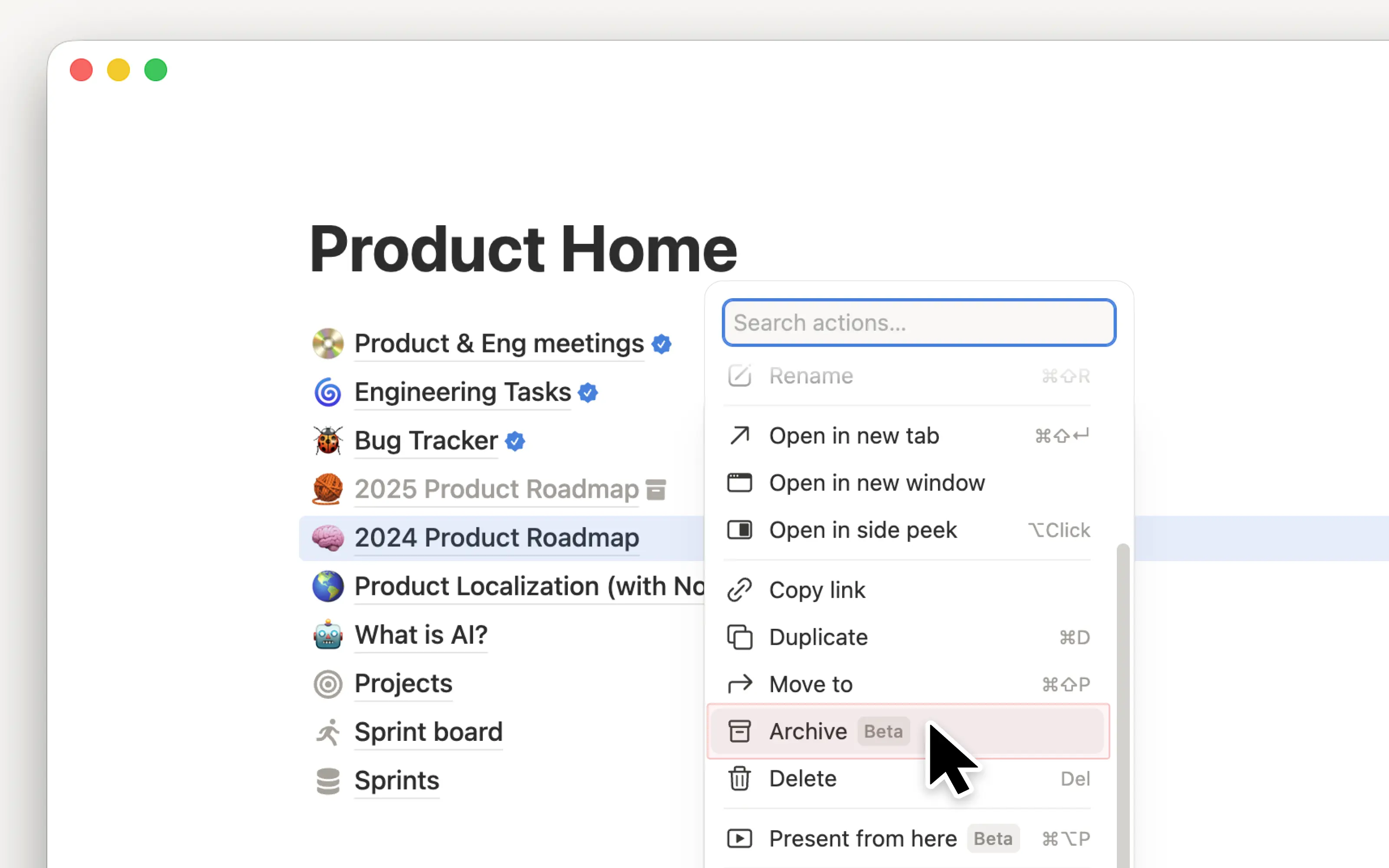
版本 / 2026年3月27日将过时的页面归档,让你的工作空间保持井然有序 通过“归档”功能,你可以将页面标记为过时,从而使工作空间保持整洁并优化搜索结果。已归档页面上会显示一个横幅,说明由谁在何时将其归档,并且这些页面默认不会出现在搜索结果、侧边栏和数据库视图中。归档上级页面后,其下级页面也会自动归档。要将页面归档,请点击页面右上角的 ••• 并选择“归档”。请访问我们的帮助中心以了解更多 →
通过“归档”功能,你可以将页面标记为过时,从而使工作空间保持整洁并优化搜索结果。已归档页面上会显示一个横幅,说明由谁在何时将其归档,并且这些页面默认不会出现在搜索结果、侧边栏和数据库视图中。归档上级页面后,其下级页面也会自动归档。要将页面归档,请点击页面右上角的 ••• 并选择“归档”。请访问我们的帮助中心以了解更多 →